
Know your controls
Know what each button does.
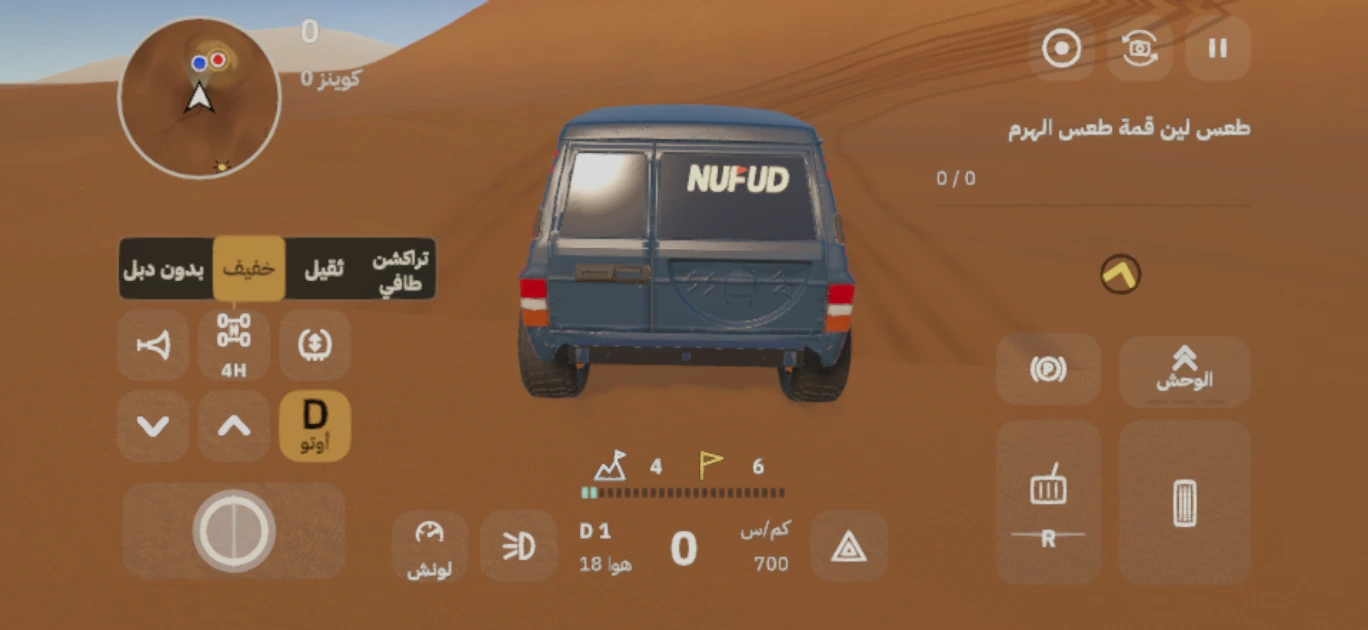
In-game capture · Arabic interface
Open the full-size image20 controls and interactive areas. Choose from the list or scroll the control names to see a precise highlight and explanation.
Steering
Move the steering control left or right to steer.
Throttle
Control the throttle as you choose your line across the sand.
Brake & reverse
Press Brake to stop. Hold it from a standstill to reverse. The bottom of the pedal gives a lighter input; the lit label shows what it does now.
D / N
Tap D Auto to select N, then tap again to return to D. In N, the throttle revs the engine without driving the truck. If the button shows a gear number, tapping it returns to Auto.
Downshift
The down arrow selects a lower gear. From N it restores drive in D. The gear key shows the gear, and the gear stays held until you tap it to return to D auto.
Upshift
The up arrow selects a higher gear. From N it restores drive in D. Watch the gear and revs; the gear key returns you to D auto.
Drive mode
Opens Rear-wheel drive, 4H and 4L. 4L stays locked until the elder’s gift. Stop before entering or leaving 4L. Traction joins this row after you find its turquoise sand form.
Tyre pressure
Stop and open the tyre control. Hold Deflate to lower the pressure or Pump to raise it, and watch the air reading. If “Stop to air down” appears, stop first.
Horn
Press the horn to sound it; keep holding for a longer honk.
Lights
Opens parking lights, low beam and high beam. Switch on the lights you need or turn them off. Spotlights and the LED bar appear when owned.
Hazards
If you are stuck and need help, stop, switch on your hazards and wait.
Traction control
After finding its turquoise sand form, open Drive mode and tap TC to switch traction control on or off. When on, it reduces wheelspin by easing wheel torque. The key shows its current state.
Beast
With at least one charged segment, hold Beast instead of the throttle for extra push. Release to stop. Its three segments are earned through achievements such as summits and clean landings, not by waiting.
Launch
When Launch is available, stop on level ground in D. Tap it once to arm it, then apply throttle. Tap again to launch, or it launches automatically after 6 seconds on the throttle.
Camera
Each tap cycles to the next camera view. This changes your viewpoint; the circle key beside it handles recording.
Gameplay recording
The circle key records gameplay. With clip buffering enabled, it saves the last few seconds. In manual mode, tap to start, then tap again to stop and save. Your phone may ask for recording permission first; availability depends on device support.
Pause
Open Sound, Car sound, Display and Driving from here.
Minimap
Tap the minimap to open the full map. It unlocks after 3 summits and lets you choose a destination. Finish an active climb or jump before opening it.
Have coffee
This appears at a camp. Stop and choose Have coffee for coffee and gearbox cooling. It is location-specific, so it is not present in every driving view.
Handbrake
The control above Brake. Tap for a short pull of the rear brakes; hold to keep them applied until you release.
Launch unlocks after its turquoise sand form is found. Traction joins the drive selector after its form is found. 4L stays locked until the elder’s gift. Have coffee appears at a camp. You do not start with every control shown here.
Found the Launch control?
When Launch is available, stop on level ground in D. Tap it once to arm it, then apply throttle. Tap again to launch, or it launches automatically after 6 seconds on the throttle.
Why is it grey?
Check that you are stopped on level ground, out of N and not being towed.